
- Joined
- 12 May 2020
- Messages
- 11,569
- Reactions Received
- 24,746
- Location
- iz*land
- Website
- linktr.ee
- Cards
- View Profile
- KS Coins
- 34,365
- Ship
- Wreck


If you're new to the forum and have no idea how voting forms work, this thread is for you! Even if you're not new, we have made some changes to the voting process so do take some time to read through this thread in order to familiarise yourself with the new voting system. You can skip the first few sections if you're familiar with how things work but you should read through the last two sections at the very least.
This thread includes a tutorial on how to create Google Forms, an explanation of the voting process, how to interpret the voting results as well as other commonly asked questions. The changes we have made to the voting process will take effect from today onwards and will be used for all awards-related activities.
What platform do I use to create the voting form?
The platform that we use to create voting forms is Google Forms. To create a voting form, you will need a Google account. If you do not have a Google account, please create one before proceeding to the next section.
How do I create a voting form?
1. Search for 'google forms' in your preferred web browser.

2. Click 'Blank form' to create a new form

What do I have to include in the voting form?
The form MUST have a compulsory username field and title indicating which voting round it is as shown below:

Don't forget to add the suggested badges to the voting form too! For badge revamp threads, the current badges will have to be included in the preliminary voting form as well. You can find the current badges here. Tip: make use of sections to make it easier for you when you check the results
If this is your first time creating a voting form, you can use this example form as reference. Click here to see an example of what a completed voting form looks like:
|NEW] Voting forms need to be approved by the awards team before being posted!
Before posting the voting forms, you must wait for the awards team to approve them. After approval, you can post the voting form.
How do I share the voting form?
Head over to this thread for the tutorial.
What are the 3 voting rounds?
For most groups and soloists, only 2 voting rounds will be needed, namely, the preliminary and final voting. However, if a tie occurs during any of these rounds, you will have to break the tie(s) by holding a tiebreaker round.
How do I decide on the number of options that the user can choose for the voting form?
We have noticed that the number of options a user is allowed to choose from often varies and this can be confusing. Thus, we have decided to standardise this by dividing the total number of suggestions for that member by 3. For example, if a member has 16 suggestions, in order to decide the number of options to choose from, simply take 16 divided by 3 which gives us 5.3333, 5.3333 rounded to the nearest whole number gives us 5. Hence, the number of options that the user can choose from will be 5.
The voting period is over, what's next?
Once the voting period is over, it is time for us to interpret the results. If an option won by a landslide in the preliminary voting (more than 50%) and the difference between the number of votes for the most-voted and second-most-voted option(s) is more than 2, the badge that won by a landslide can be deemed as the winning badge and will not have to be included in the final voting form. However, if there are ties, you must include the tied badges in the next voting round. Below are some scenarios to help you understand better:
Scenario 1: Won by a landslide
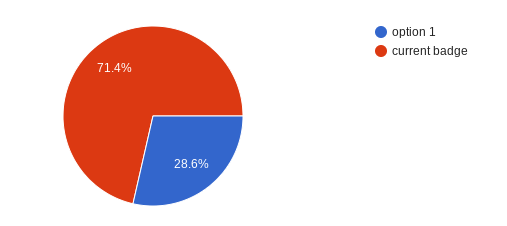
Since the current badge (red) won by a landslide, it is deemed as the winning badge and will not have to be included in the next voting round.
Scenario 2: Did not win by a landslide and is tied with other options
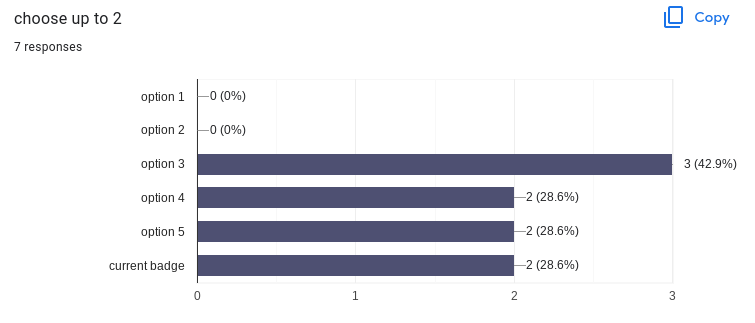
Even though only 2 badges are to proceed to the next voting round, it is impossible for only 2 badges to proceed as there are 3 options that are tied with 2 votes each and a close difference of 1 between the most voted and the second most voted option. In this case, options 3, 4, 5 and the current badge will proceed to the next voting round instead.
Scenario 3: Tied options
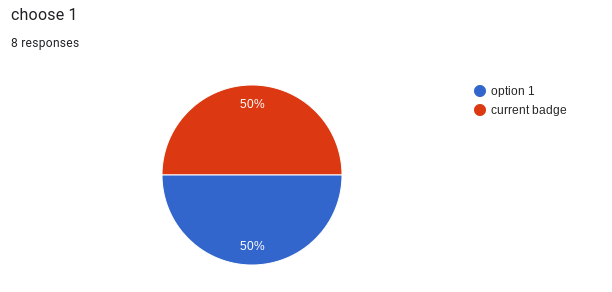
Even though only 1 option was supposed to proceed to the next voting round as implied from "choose 1" in the title, both badges are tied and thus, both badges will have to be included in the next voting round.
If you have any questions, please feel free to ask us and we will be more than happy to help
This thread includes a tutorial on how to create Google Forms, an explanation of the voting process, how to interpret the voting results as well as other commonly asked questions. The changes we have made to the voting process will take effect from today onwards and will be used for all awards-related activities.
What platform do I use to create the voting form?
The platform that we use to create voting forms is Google Forms. To create a voting form, you will need a Google account. If you do not have a Google account, please create one before proceeding to the next section.
How do I create a voting form?
1. Search for 'google forms' in your preferred web browser.
2. Click 'Blank form' to create a new form
What do I have to include in the voting form?
The form MUST have a compulsory username field and title indicating which voting round it is as shown below:
Don't forget to add the suggested badges to the voting form too! For badge revamp threads, the current badges will have to be included in the preliminary voting form as well. You can find the current badges here. Tip: make use of sections to make it easier for you when you check the results
If this is your first time creating a voting form, you can use this example form as reference. Click here to see an example of what a completed voting form looks like:
|NEW] Voting forms need to be approved by the awards team before being posted!
Before posting the voting forms, you must wait for the awards team to approve them. After approval, you can post the voting form.
How do I share the voting form?
Head over to this thread for the tutorial.
What are the 3 voting rounds?
For most groups and soloists, only 2 voting rounds will be needed, namely, the preliminary and final voting. However, if a tie occurs during any of these rounds, you will have to break the tie(s) by holding a tiebreaker round.
How do I decide on the number of options that the user can choose for the voting form?
We have noticed that the number of options a user is allowed to choose from often varies and this can be confusing. Thus, we have decided to standardise this by dividing the total number of suggestions for that member by 3. For example, if a member has 16 suggestions, in order to decide the number of options to choose from, simply take 16 divided by 3 which gives us 5.3333, 5.3333 rounded to the nearest whole number gives us 5. Hence, the number of options that the user can choose from will be 5.
The voting period is over, what's next?
Once the voting period is over, it is time for us to interpret the results. If an option won by a landslide in the preliminary voting (more than 50%) and the difference between the number of votes for the most-voted and second-most-voted option(s) is more than 2, the badge that won by a landslide can be deemed as the winning badge and will not have to be included in the final voting form. However, if there are ties, you must include the tied badges in the next voting round. Below are some scenarios to help you understand better:
Scenario 1: Won by a landslide
Since the current badge (red) won by a landslide, it is deemed as the winning badge and will not have to be included in the next voting round.
Scenario 2: Did not win by a landslide and is tied with other options
Even though only 2 badges are to proceed to the next voting round, it is impossible for only 2 badges to proceed as there are 3 options that are tied with 2 votes each and a close difference of 1 between the most voted and the second most voted option. In this case, options 3, 4, 5 and the current badge will proceed to the next voting round instead.
Scenario 3: Tied options
Even though only 1 option was supposed to proceed to the next voting round as implied from "choose 1" in the title, both badges are tied and thus, both badges will have to be included in the next voting round.
If you have any questions, please feel free to ask us and we will be more than happy to help